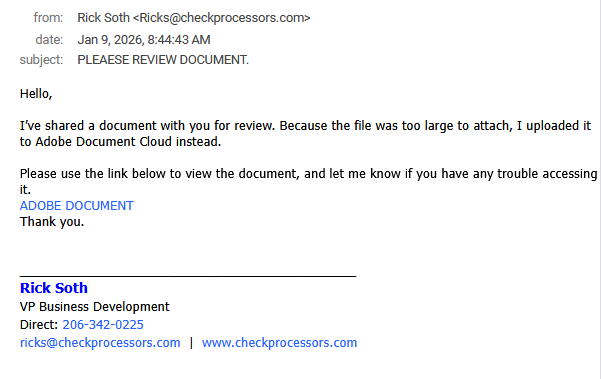
Original Phishing Message
From: Ricks[@]checkprocessors[.]com
Subject: PLEAESE REVIEW DOCUMENT.
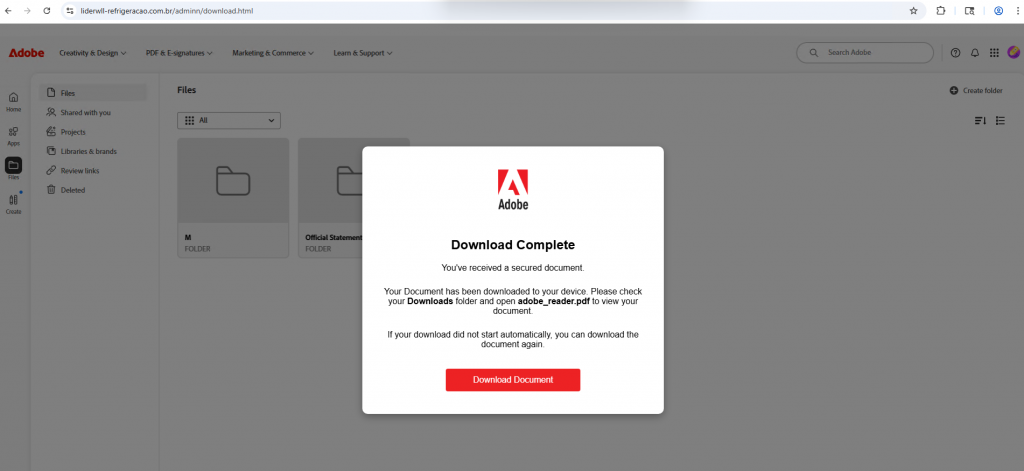
Where did the link lead?
The link leads to liderwll-refrigeracao[.]com[.]br instead of Adobe Document Cloud but attempts to mimic the look and feel of Adobe. This should be suspicious. The page prompts you to download something.
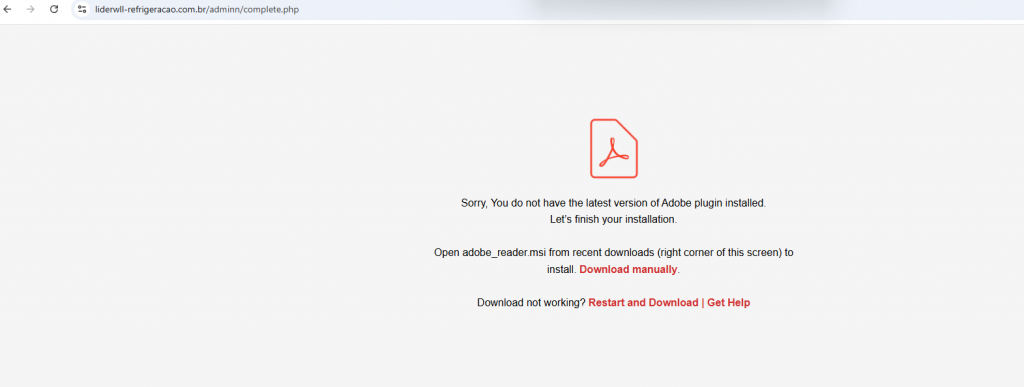
When clicking the link to download the document, it triggers a download of a file called “adobe_reader.msi” which is not a document. Files with the extension .msi or .exe are for installing software on Windows. Use caution before ever opening or executing these as it may install malware on your device. In this instance, though the file name seems to indicate Adobe Reader would be installed, the file is in fact malicious software. When installing software, always go to the known website for the application. Notice the URL is not on an Adobe website.
Tips for Detection
- Are you expecting an email from this sender? Beware of document shares from senders you do not recognize. Many phishing attempts abuse legitimate cloud-sharing sites.
- Notice the typo in the subject line.
- Hover over the link. The link does not go to Adobe’s website but instead goes to liderwll-refrigeracao[.]com[.]br.
Text of Phishing Message
From: Ricks[@]checkprocessors[.]com
Subject: PLEAESE REVIEW DOCUMENT.
Hello,
I’ve shared a document with you for review. Because the file was too large to attach, I uploaded it to Adobe Document Cloud instead.
Please use the link below to view the document, and let me know if you have any trouble accessing it.
ADOBE DOCUMENT
Thank you.